BROSH CRM API Server
Connect BROSH CRM to ChatGPT, Claude, VS Code, and any MCP client. This CRM MCP server delivers secure OAuth2, AI CRM automation, and fast setup with one MCP link.
Use Cases First: Real Team Workflows
Launch production-grade AI CRM workflows from day one with practical, high-impact use cases.
- 📈Sales acceleration: prioritize hot leads and trigger next actions instantly.
Sample: "Find leads scored above 80 with no activity in 5 days and generate next-step outreach by owner." - 🎯Pipeline hygiene: detect stale opportunities, missing close dates, and invalid stages before forecast calls.
Sample: "Show deals stuck in stage for 21+ days with missing close dates and suggest corrected updates." - 🧩Schema modification: create and modify BROSH CRM fields with MCP before import and operations.
Sample: "Learn CSV columns, add missing fields in BROSH CRM, then import contacts safely." - ✉️Outreach smart automation: send newsletter templates or one-by-one tailored messages directly through MCP.
Sample: "Use a CRM newsletter template for campaigns, or generate personalized product emails per contact and send them one by one." - 🧾Executive snapshots: generate weekly KPIs across deals, tickets, retention, and payments in one query.
Sample: "Build this week's exec dashboard: pipeline coverage, win-rate trend, overdue invoices, and churn-risk changes." - 🛟Support intelligence: surface overdue SLA tickets and summarize root causes by account segment.
Sample: "List tickets likely to breach SLA in 12 hours, grouped by priority, ARR, and issue cluster." - 🔁Automation playbooks: run repeatable CRM workflows with consistent team-ready output.
Sample: "Run Monday rev-ops checklist: stale deals, missing decision-makers, at-risk renewals, and owner actions."
Use Cases By Function
Teams use BROSH MCP to automate repetitive CRM work and get faster answers from live business data.
-
AI Data Enrichment
Enrich CRM records with missing firmographic and contact data using AI insights.
Sample prompt: "Identify contacts missing title, industry, and company size, research relevant values, then update each record with confidence notes." -
Customer Prospecting
Discover new potential customers from market signals and automatically add them to CRM.
Sample prompt: "Scan the stock exchange and suggest customers that may need my service/product, get their details, and enter them into the CRM." -
Sales Pipeline
Score leads, prioritize outreach, and predict revenue from qualified opportunities.
Sample prompt: "Show SQL leads above score 80 with no call in 5 days and suggest the top 10 to contact today." -
CSV Import + Field Revision
Learn the CSV structure, detect missing CRM fields, then revise/add fields with MCP before import.
Sample prompt: "Analyze this CSV, identify missing fields in contacts, create or modify the fields in BROSH CRM, then import all valid rows." -
Template Newsletter Send
Send campaign or newsletter emails directly from a CRM template with merge fields and approved sender sets.
Sample prompt: "Use newsletter template 42, send to all active customers in segment SMB, and log delivery task as June Product Update." -
AI Tailored Email Outreach
Run market research per account/contact, generate a unique product message, then send one-by-one personalized emails through MCP.
Sample prompt: "Research each target account, write a custom value proposition for our product, and send an individual tailored email to each contact." -
Customer Success
Review account timelines, update health notes, and flag churn signals earlier.
Sample prompt: "List accounts with declining activity and open tickets, then draft next best actions for each CSM." -
Marketing Ops
Build audience segments, evaluate campaign ROI, and validate attribution quality.
Sample prompt: "Find campaigns with CPC above target and low conversion rate, then recommend reallocation by channel." -
Support Teams
Create and manage tickets, monitor SLA risk, and summarize issue clusters.
Sample prompt: "Show P1/P2 tickets at SLA risk in the next 12 hours grouped by account ARR and owner." -
Executive Reporting
Generate board-ready summaries for pipeline, payments, retention, and activity.
Sample prompt: "Generate this week's executive dashboard with pipeline coverage, win rate trend, and churn risk movement." -
Data Migration
Map fields from legacy systems, validate data quality, and bulk import safely.
Sample prompt: "Map legacy CRM fields to BROSH schema and identify records that will fail import before execution."
Simple Installation (No Login Required to View)
Setup is intentionally simple. You only need the MCP link and an OAuth sign-in when your client connects.
Add MCP Link
Use https://mcp.brosh.io as your server URL in ChatGPT, Claude, VS Code, Cline, or any MCP client.
Authenticate Once
Choose OAuth and sign in with your BROSH account. The server handles discovery and token exchange automatically.
Start CRM Work
Ask in natural language to search leads, update records, create opportunities, manage tickets, and generate reports.
Core Endpoints
OAuth discovery: https://mcp.brosh.io/.well-known/oauth-authorization-server
API schema: https://mcp.brosh.io/api/openapi.json
Open CRM
Need the full CRM interface? Open app.brosh.io anytime.
How To Add In ChatGPT And Claude
The setup flow is almost identical in both clients.
Give It A Name
Create a new connector/app and choose any name, for example BROSH CRM.
Paste MCP URL
Paste https://mcp.brosh.io as the MCP server URL.
Click Connect
Click connect/add, then complete OAuth login when prompted.
ChatGPT MCP Setup
Screenshot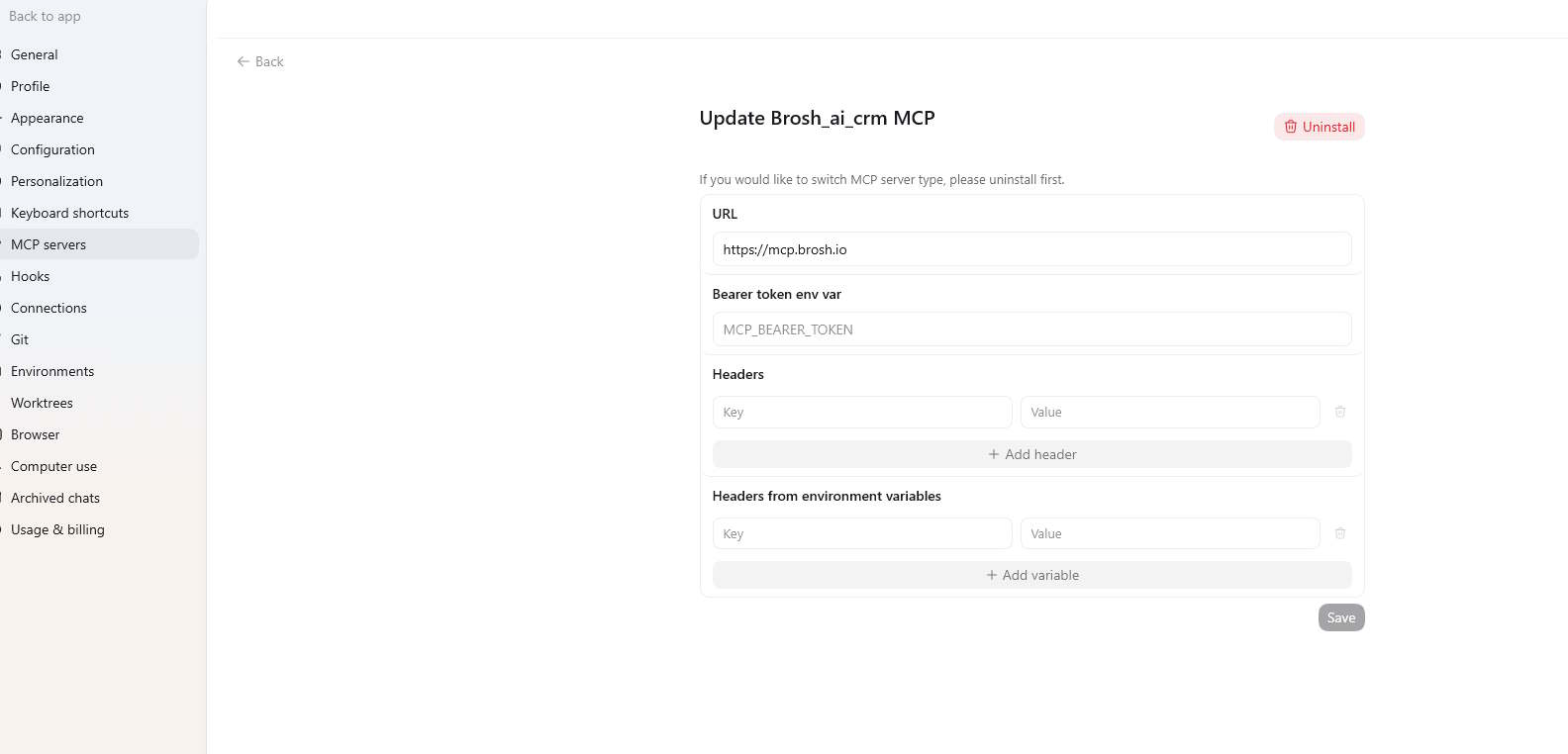
- Open connectors/tools and create a new MCP connection.
- Name it BROSH CRM and paste
https://mcp.brosh.io. - Click connect and finish OAuth in the browser popup.
Claude MCP Setup
Screenshot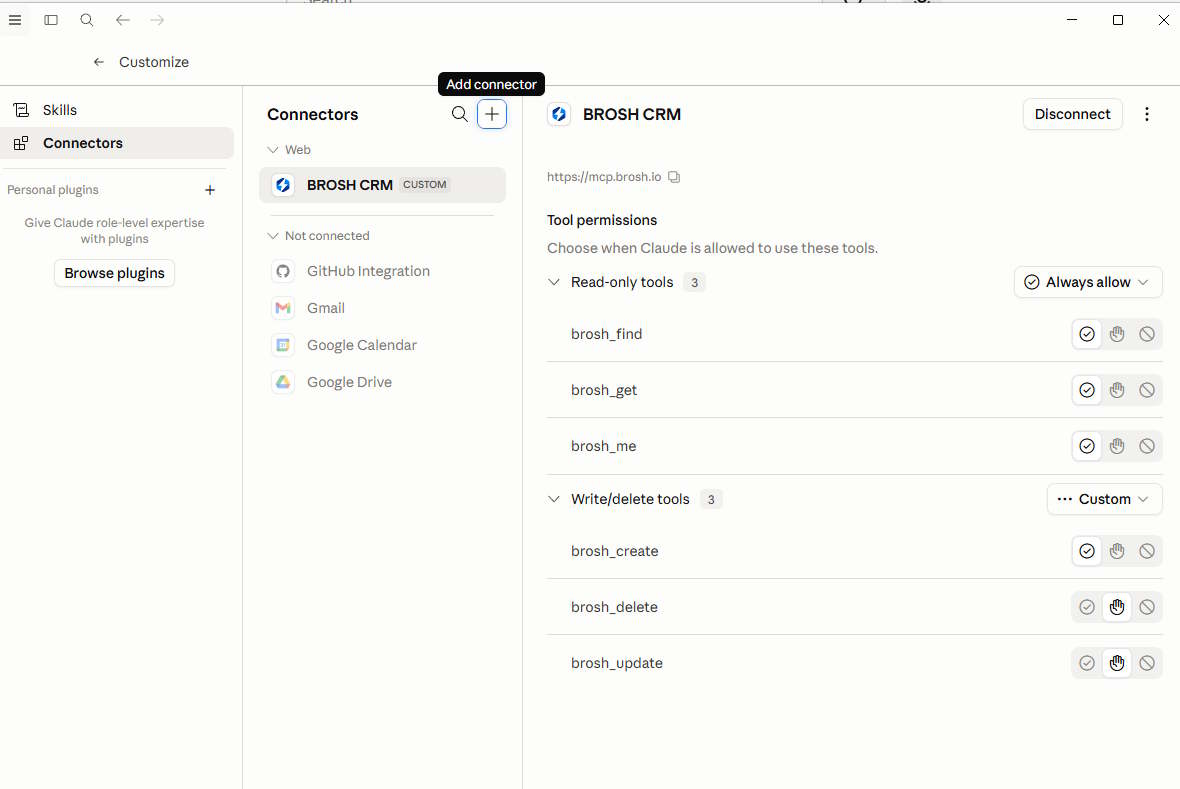
- Add a new MCP server in Claude settings.
- Use server URL
https://mcp.brosh.ioand save. - Authorize once, then start querying and updating CRM from chat.
Features
Everything you need to run BROSH CRM through MCP with security, speed, and automation.
Enterprise OAuth2
Secure auth, scoped access, and robust session handling.
Full CRUD
Create, read, update, and delete records across key CRM tables.
AI Native
Ask in natural language and execute multi-step CRM workflows.
Zero Config
Add the MCP URL, sign in, and start using it in minutes.
Token Auto Refresh
Expired tokens are refreshed automatically when possible.
OpenAI/Claude Ready
Works with modern MCP clients and OAuth discovery flows.
Use Cases
Common ways teams use BROSH MCP in daily operations.
AI Data Enrichment
- Detect missing CRM attributes automatically
- Research and infer relevant values with AI
- Sample prompt: "Tell me which account and contact fields are missing, enrich them with researched values, and update each record."
Customer Prospecting
- Scan public market activity for likely customer demand
- Capture company and decision-maker details
- Sample prompt: "Scan the stock exchange and suggest customers that may need my service/product, get their details, and enter them into the CRM."
Sales Pipeline
- Score leads and prioritize outreach
- Track stage progression
- Sample prompt: "List enterprise deals over 75k with no activity in 7 days and propose next steps."
CSV Import With Field Revision
- Learn CSV headers and compare against CRM schema
- Create or modify missing fields through MCP before import
- Sample prompt: "Review this CSV, add missing contact fields in BROSH CRM, and import the cleaned dataset."
CRM Template Newsletter
- Use existing CRM templates with dynamic fields
- Send newsletter campaigns directly via MCP send-email tools
- Sample prompt: "Send the monthly newsletter template to all customers with active subscriptions and include account-level merge fields."
Custom AI Tailored Email
- Research each customer/account before outreach
- Generate and send one-by-one personalized product emails
- Sample prompt: "Do market research for each lead, write a custom product pitch, and send each customer a tailored email via MCP."
Customer Success
- Review account history instantly
- Update contact and account info
- Sample prompt: "Find at-risk accounts with low usage and open tickets, then suggest recovery actions."
Support Operations
- Create and update tickets
- Monitor SLA response times
- Sample prompt: "Show all tickets that may breach SLA in 12 hours sorted by customer value."
Who It’s For
Built for every role that needs fast CRM action from AI.
Sales Teams
- Update deals from chat
- Access customer context live
- Generate quick reports
Customer Success
- Track health and support
- Manage accounts faster
- Reduce manual data entry
Executives & Ops
- Get live KPI snapshots
- Ask plain-English questions
- Accelerate decisions
OpenAI Responses API (MCP)
After login, use the issued MCP token as authorization and point server_url to the MCP endpoint.
Custom GPT Actions OAuth: https://mcp.brosh.io/api/oauth/authorize and https://mcp.brosh.io/api/oauth/token
Common Prompt Examples
"Show enterprise leads created in the last 14 days with score above 80 and no call logged in 5 days."
"Create a renewal opportunity for Acme Q3 Expansion, value 120000, close date Sep 30, owner Sarah."
"List support tickets breaching SLA in the next 12 hours, grouped by priority and account ARR."
Automation Scenarios
Auto-generate follow-up tasks after discovery calls, summarize weekly account risk changes, and build manager-ready pipeline digests in seconds.
Benefits of Using MCP
Model Context Protocol turns BROSH into an AI-ready CRM platform with secure, scalable connectivity for real business workflows.
- 🔐Secure OAuth2 architecture: standards-based authorization, scoped access, and automatic token refresh support.
- ⚡Fast enterprise rollout: one MCP URL for ChatGPT, Claude, VS Code, and compatible AI assistants.
- 📊Full CRM API coverage: read, create, update, and delete records across sales, support, and operations data.
- 🧠Higher team productivity: replace repetitive manual CRM clicks with natural-language commands.